
Short answer: A document control SOP defines how the lab drafts, numbers, approves, distributes, reviews and retires SOPs, forms and policies so only current, director-approved versions are in use. This free template downloads as a fillable PDF and an editable Word file.
Last reviewed November 26, 2026. Governing requirement: 42 CFR 493.1251(d)-(e) and 493.1105(a)(2).
These templates are free, general starting points, not legal or regulatory advice. Every template must be reviewed and approved, signed and dated by your laboratory director, and adapted to your lab's instruments, test systems and the manufacturer's instructions, your state rules and your accreditation organization's standards before use.
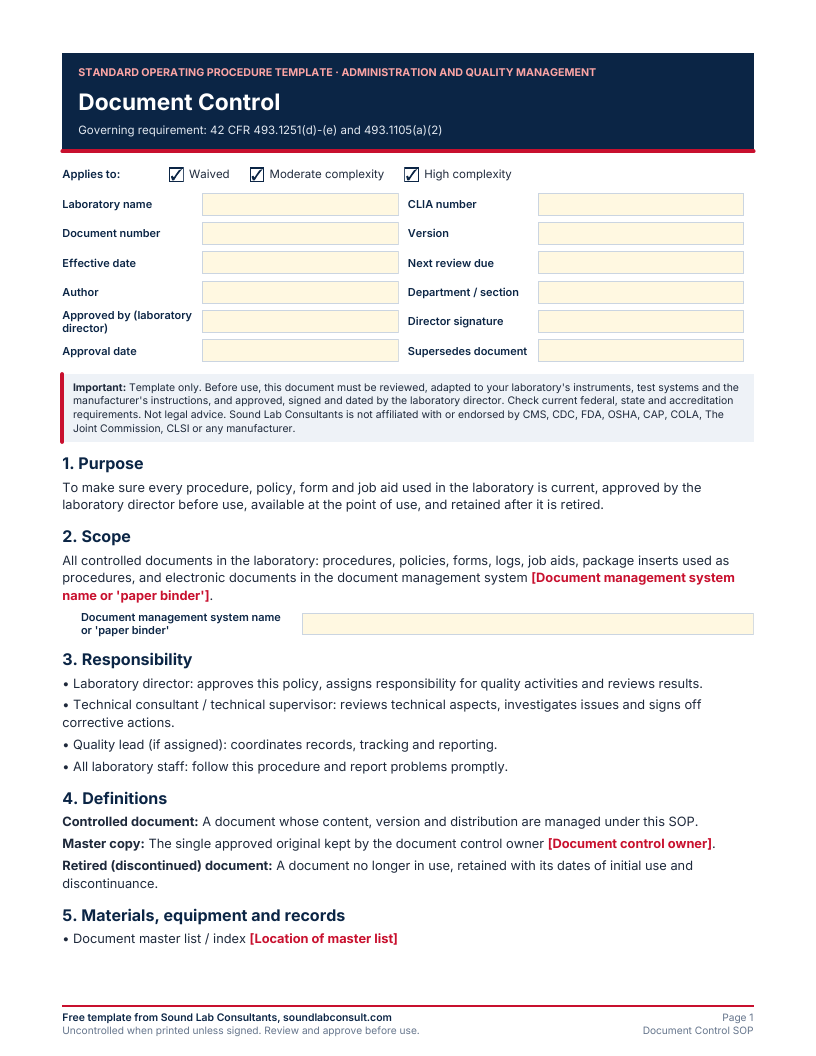
What this Document Control SOP must contain
Purpose: To make sure every procedure, policy, form and job aid used in the laboratory is current, approved by the laboratory director before use, available at the point of use, and retained after it is retired.
Scope: All controlled documents in the laboratory: procedures, policies, forms, logs, job aids, package inserts used as procedures, and electronic documents in the document management system [Document management system name or 'paper binder'].
The template includes these sections:
- Header block: laboratory name, CLIA number, document number, version, effective date, next review, author, approval by the laboratory director with signature and date
- Purpose and scope
- Responsibility by role
- Definitions
- Materials, equipment and records
- Step-by-step procedure (11 steps)
- Quality control
- Interpretation, reporting and documentation
- Limitations and cautions
- References to the governing regulation and guidance
- Fillable form: Document master list (7 columns)
- Lab-specific notes
- Revision history and annual review log (fillable)
Why labs need it
This procedure supports 42 CFR 493.1251(d)-(e) and 493.1105(a)(2). Under 42 CFR 493.1251, a nonwaived laboratory must have written procedures that staff follow, and the laboratory director must approve, sign and date each procedure and every change before use. Waived labs must follow the manufacturer's instructions exactly, and written procedures help show they do. Surveyors and accreditation inspectors usually ask to see the procedure, the related records and evidence that staff were trained on it.
Procedure outline
The highlighted items are fill-in fields in the PDF and Word versions.
- Draft new or revised documents using the laboratory SOP format (see the Writing and Formatting SOPs template). Assign the next number from the master list.
- Route the draft for technical review by the technical consultant or technical supervisor and record reviewer comments.
- Obtain laboratory director approval: signature and date before the document is used. Changes to a procedure also require director signature and date before use (42 CFR 493.1251(d)).
- Record the effective date and version on the document and update the master list the same day.
- Train affected staff and document that they read the new or revised document before they use it [Read-and-sign method].
- Distribute controlled copies to [Point-of-use locations] and remove all superseded copies from work areas at the same time.
- Mark retired documents with the discontinuance date, move them to the archive and keep them at least 2 years after discontinuance (42 CFR 493.1105(a)(2)).
- Review every controlled document at least every [Review frequency, e.g. annually] and whenever the test system, manufacturer instructions, regulation or laboratory director changes.
- When a new laboratory director is appointed, have the new director review and sign all procedures before or upon assuming responsibility [Days allowed].
- Control external documents (package inserts, operator manuals, regulations) by recording the version or date in use and checking for updates at each review.
- Do not allow handwritten changes on controlled copies unless initialed, dated and approved by [Who may approve interim changes].
Quality control and documentation
- Audit the master list against point-of-use copies [Audit frequency] and record discrepancies.
- Any use of an unapproved or outdated document is handled as an occurrence (nonconforming event).
- The master list must show document number, title, version, effective date, last review date and status.
- Keep approval records and read-and-sign records with the document history.
Limitations
- Electronic systems must prevent edits to approved versions without a new approval cycle.
- Printed copies are uncontrolled unless stamped or signed as controlled copies.
- This is a generic template. Adapt it to your instruments, test systems, manufacturer instructions, state law and accreditation standards before use.
Key definitions
- Controlled document: A document whose content, version and distribution are managed under this SOP.
- Master copy: The single approved original kept by the document control owner [Document control owner].
- Retired (discontinued) document: A document no longer in use, retained with its dates of initial use and discontinuance.
Fields you fill in
Besides the header block, revision history and annual review log, this template has 11 lab-specific fields:
- Document management system name or 'paper binder'
- Location of master list
- Numbering format, e.g. DEPT-TYPE-###
- Archive location
- Read-and-sign method
- Point-of-use locations
- Review frequency, e.g. annually
- Days allowed
- Who may approve interim changes
- Audit frequency
- Document control owner
How to adopt this template
- Download the PDF or Word version above.
- Fill in the header block and every highlighted field. Where a field says "per manufacturer", copy the value from your current package insert or operator manual.
- Delete steps that do not apply and add any steps your test system or state requires.
- Have the technical consultant or technical supervisor review it, then have the laboratory director sign and date it before use.
- Train staff, document their review, and add the SOP to your document control master list.
Need procedures written for your lab?
Sound Lab Consultants writes and reviews complete procedure manuals that match your instruments, test menu and certificate type. Book a free consultation to talk through what your lab needs.
Book a free consultationFrequently asked questions
Is this Document Control SOP template free?
Yes. The Document Control SOP template is a free download as a fillable PDF and an editable Word (.docx) file. There is no email gate or sign-up.
What regulation does a document control procedure address?
This template is built around 42 CFR 493.1251(d)-(e) and 493.1105(a)(2). Read the current text at the official source linked on this page, and check your state and accreditation organization for added requirements.
Can our lab use this SOP as-is?
No. Use it as a starting point. Fill in the highlighted fields, adapt the steps to your instruments and the manufacturer's instructions, and have the laboratory director approve, sign and date it before use (42 CFR 493.1251(d)).
Which labs is this template for?
It is written for waived, moderate and high complexity laboratories, as marked in the template's 'Applies to' boxes. Uncheck any that do not apply to your lab.
How do I fill in the PDF?
Open the PDF in a PDF reader that supports forms, click the shaded fields and type. Save a copy. In the Word version, click each highlighted field (a content control) and type over it.
Official sources
- eCFR, 42 CFR 493.1251(d)-(e) and 493.1105(a)(2)
- eCFR, 42 CFR Part 493 Laboratory Requirements (CLIA)
- CMS, State Operations Manual Appendix C: Survey procedures and interpretive guidelines for laboratories
- eCFR, 42 CFR Part 493 Subpart K: Quality system for nonwaived testing
- eCFR, 42 CFR 493.1251
- eCFR, 42 CFR 493.1105
Related SOP templates
These templates are free, general starting points, not legal or regulatory advice. Every template must be reviewed and approved, signed and dated by your laboratory director, and adapted to your lab's instruments, test systems and the manufacturer's instructions, your state rules and your accreditation organization's standards before use. Sound Lab Consultants is not affiliated with or endorsed by CMS, CDC, FDA, OSHA, HHS, CAP, COLA, The Joint Commission, CLSI, any state agency, or any instrument or reagent manufacturer. CLSI and other standards are referenced by name only. Sound Lab Consultants, 25 Arizona Pl, Chandler, AZ 85225.